Menu
Peak Form
03.2026
Duration
2 Months
Role
UX Designer
Project Type
Client
Tools Used
Figma, Base44
About
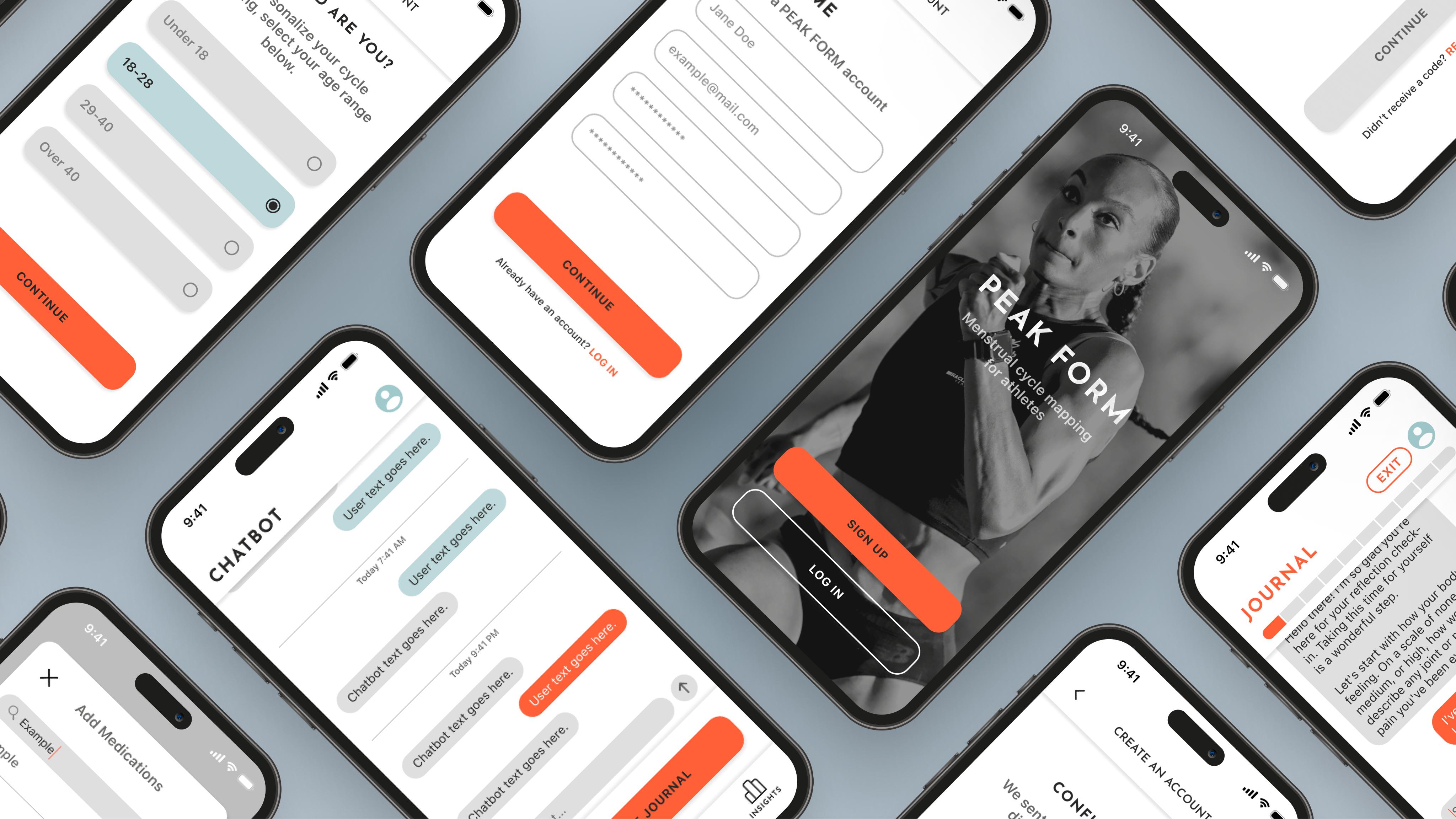
Peak Form helps female athletes optimize their performance through personalized training plans.
The Problem
Peak Form currently has a journaling feature to collect data from it’s users so the app can form personalized recommendations, but many users are not utilizing it.
Research
Through user interviews and surveys, I aim to:
- Learn about user’s habits when using Peak Form
- Discover what other health apps Peak Form’s users are utilizing
- Identify any frustrations or pain points surrounding Peak Form’s current journal feature
Unavailablilty
Users tend to go on the app during pockets of free time throughout their day. Many feel that the journal feature takes too long to complete during that time.
Functionality
Of those surveyed and interviewed, almost all were frustrated about the feature’s use of drop downs. Users described them as “clunky.”
Limited Answers
Among those interviewed, several wished they could give more context answering the journal questions to have improved recommendations.
Ideation
- Will users be comfortable with providing personal information to AI?
- Will users find typing their answers time consuming?
- How will react to the ambiguity that comes with open ended answers?
- How can I differentiate the chatbot feature from the journal feature?
- Will users still want more standard multiple choice options?
AI User Testing
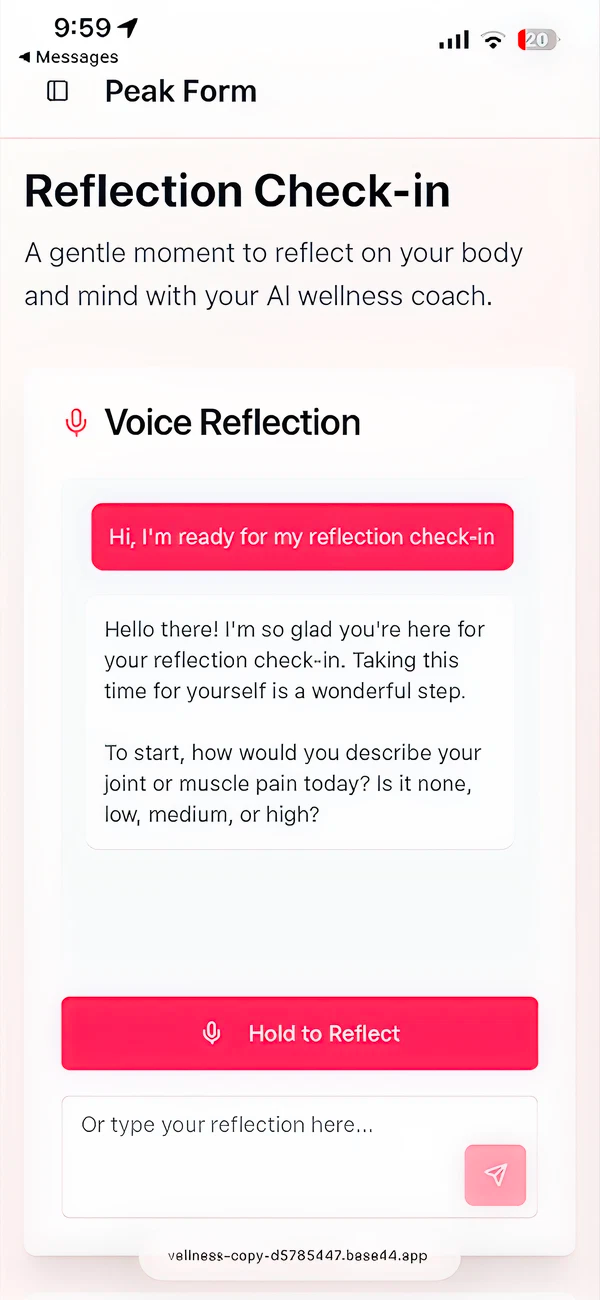
To gage user’s feelings regarding the potential implementation of AI, I used AI to create a prototype of the chatbot journal feature and tested it with users.
AI Overall
Users generally responded positively to the idea of AI being implemented into the app.
AI and Personal Data
Users expressed concerns about data privacy, but were ultimately open to share data for personalized insights as long as safeguards are implemented.
Typing Responses
Some users found typing their responses to be a bit tedious, however, felt it was an improvement from the current method.
Response Ambiguity
Most users enjoyed having the option to provide more detailed responses. Some gave one-word responses, but expressed their appreciation for having the option to give more details.
Wireframes
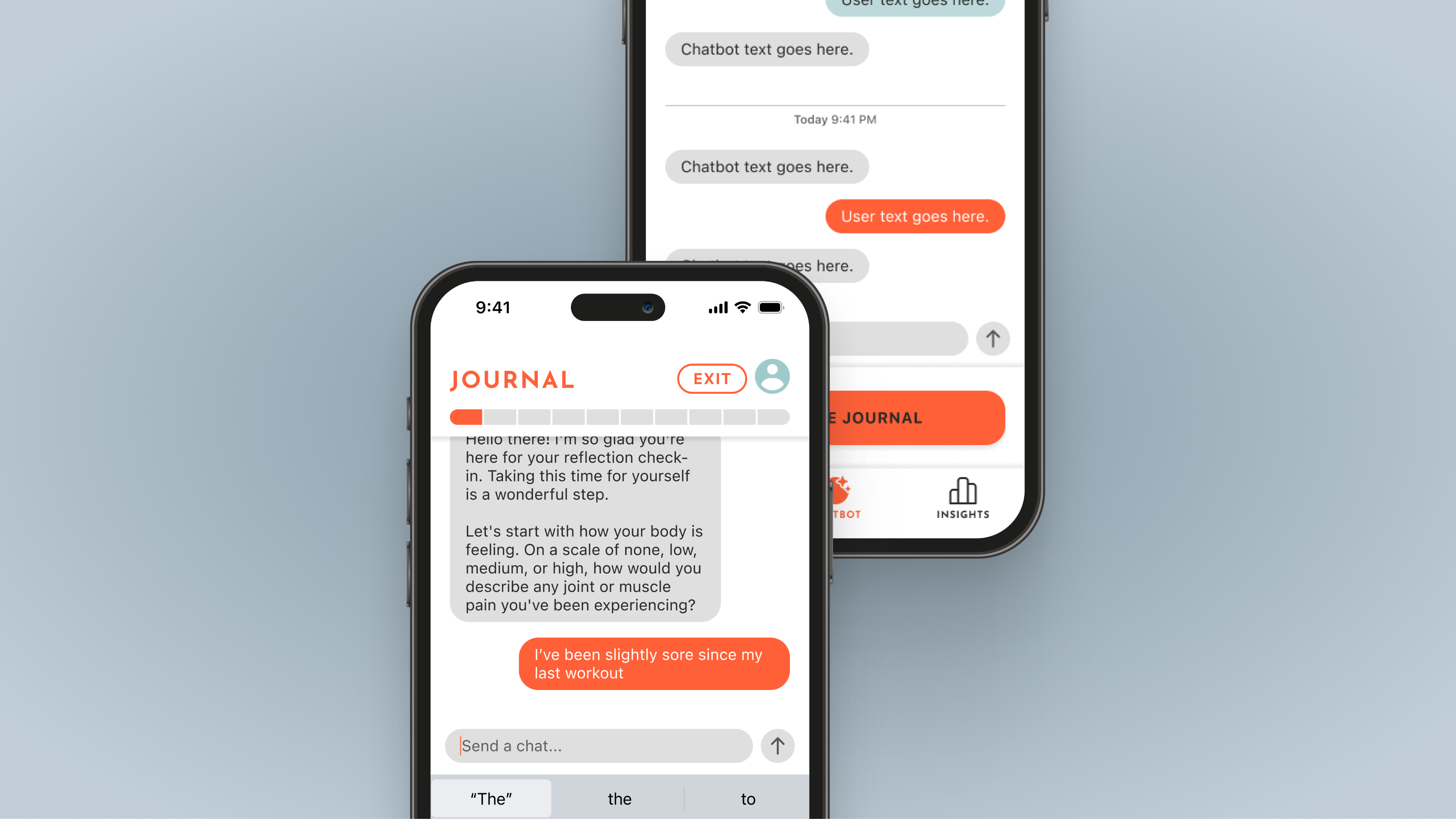
Initial sketch that focuses on laying out the functionality for the following key feature:

Journal
- Change in text bubble color to indicate journal vs. chatbot conversations
- Progress indicator to let users know how close they are to completing their journal
- Option to exit or resume the journal so users can complete when desired
Key Functions
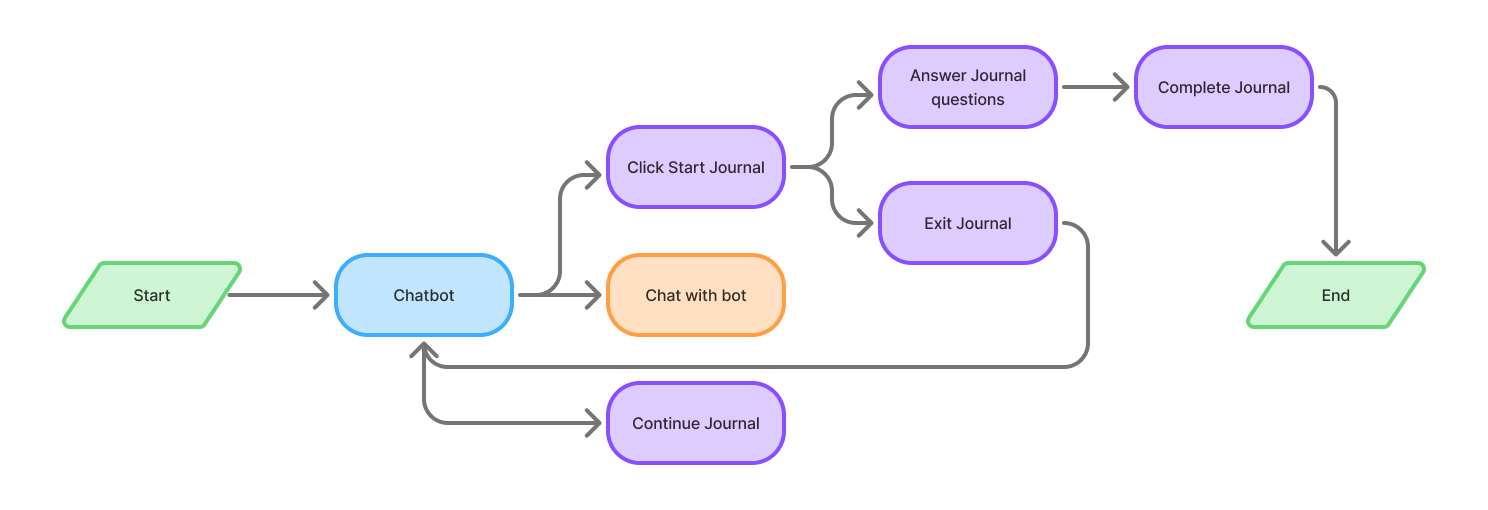
Flow that shows the functionality for the following key feature:
Journal
Users were frustrated with the time it took to complete the journal. Now they can start, pause, and resume whenever they like. The user also can now decide how much time they want to commit to the journal by providing as little or as much information as they want.
The clunky drop down menus are a thing of the past. Users can swiftly type their response and no longer have to fidget with opening and closing menus.
Users desired the option to provide more context to their journal responses. By using AI, they can now add as much detail as they want and also now have the ability to clarify their response for more personalized recommendations.
Takeaways
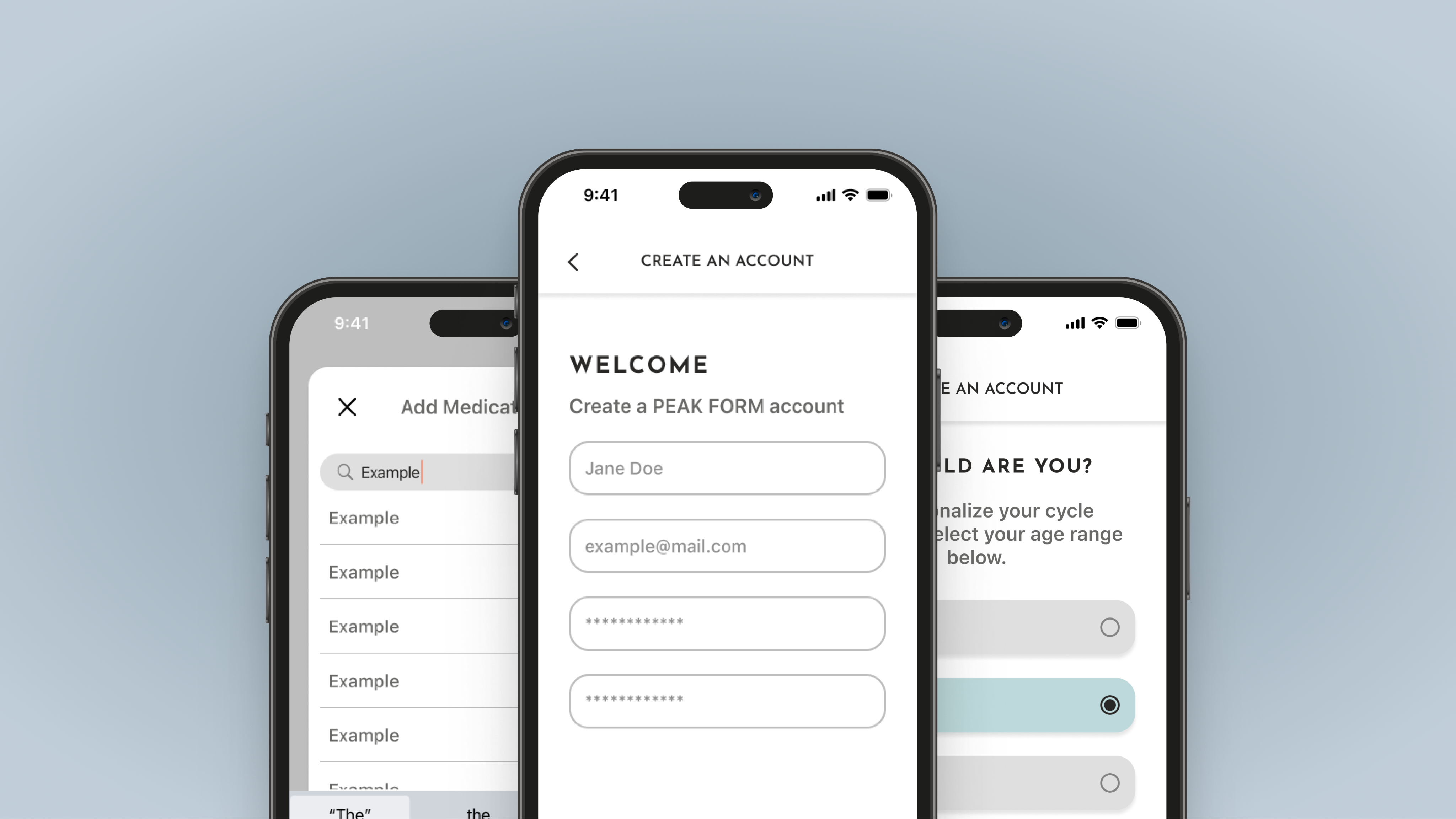
After I completed designing and prototyping the journal and onboarding flows, I handed off my designs to Peak Form’s developers. With the implementation of the improved features, Peak Form has seen both an increase in users and an increase in users who are utilizing the journal feature.
Working on Peak form has encouraged me to explore new tools to expedite and improve my design process and has provided me with the opportunity to work closely with users and constantly test the developing product with them.

Peak Form
03.2026
Duration
2 Months
Role
UX Designer
Project Type
Client
Tools Used
Figma, Base44
About
Peak Form helps female athletes optimize their performance through personalized training plans.
The Problem
Peak Form currently has a journaling feature to collect data from it’s users so the app can form personalized recommendations, but many users are not utilizing it.
Research
Through user interviews and surveys, I aim to:
- Learn about user’s habits when using Peak Form
- Discover what other health apps Peak Form’s users are utilizing
- Identify any frustrations or pain points surrounding Peak Form’s current journal feature
Time
Users tend to go on the app during pockets of free time throughout their day. Many feel that the journal feature takes too long to complete during that time.
Functionality
Of those surveyed and interviewed, almost all were frustrated about the feature’s use of drop downs. Users described them as “clunky.”
Limited Answers
Among those interviewed, several wished they could give more context answering the journal questions to have improved recommendations.
Ideation
- Will users be comfortable with providing personal information to AI?
- Will users find typing their answers time consuming?
- How will react to the ambiguity that comes with open ended answers?
- How can I differentiate the chatbot feature from the journal feature?
- Will users still want more standard multiple choice options?
AI User Testing
To gage user’s feelings regarding the potential implementation of AI, I used AI to create a prototype of the chatbot journal feature and tested it with users.
AI Overall
Users generally responded positively to the idea of AI being implemented into the app.
AI and Personal Data
Users expressed concerns about data privacy, but were ultimately open to share data for personalized insights as long as safeguards are implemented.
Typing Responses
Some users found typing their responses to be a bit tedious, however, felt it was an improvement from the current method.
Response Ambiguity
Most users enjoyed having the option to provide more detailed responses. Some gave one-word responses, but expressed their appreciation for having the option to give more details.
Wireframes
Initial sketch that focuses on laying out the functionality for the following key feature:
Journal
- Change in text bubble color to indicate journal vs. chatbot conversations
- Progress indicator to let users know how close they are to completing their journal
- Option to exit or resume the journal so users can complete when desired
Key Functions
Flow that shows the functionality for the following key feature:
Journal
Users were frustrated with the time it took to complete the journal. Now they can start, pause, and resume whenever they like. The user also can now decide how much time they want to commit to the journal by providing as little or as much information as they want.
The clunky drop down menus are a thing of the past. Users can swiftly type their response and no longer have to fidget with opening and closing menus.
Users desired the option to provide more context to their journal responses. By using AI, they can now add as much detail as they want and also now have the ability to clarify their response for more personalized recommendations.
Takeaways
After I completed designing and prototyping the journal and onboarding flows, I handed off my designs to Peak Form’s developers. With the implementation of the improved features, Peak Form has seen both an increase in users and an increase in users who are utilizing the journal feature.
Working on Peak form has encouraged me to explore new tools to expedite and improve my design process and has provided me with the opportunity to work closely with users and constantly test the developing product with them.
Peak Form
03.2026
Duration
2 Months
Role
UX Designer
Project Type
Client
Tools Used
Figma, Base44
About
Peak Form helps female athletes optimize their performance through personalized training plans.
The Problem
Peak Form currently has a journaling feature to collect data from it’s users so the app can form personalized recommendations, but many users are not utilizing it.
Research
Through user interviews and surveys, I aim to:
- Learn about user’s habits when using Peak Form
- Discover what other health apps Peak Form’s users are utilizing
- Identify any frustrations or pain points surrounding Peak Form’s current journal feature
Time
Users tend to go on the app during pockets of free time throughout their day. Many feel that the journal feature takes too long to complete during that time.
Functionality
Of those surveyed and interviewed, almost all were frustrated about the feature’s use of drop downs. Users described them as “clunky.”
Limited Answers
Among those interviewed, several wished they could give more context answering the journal questions to have improved recommendations.
Ideation
- Will users be comfortable with providing personal information to AI?
- Will users find typing their answers time consuming?
- How will react to the ambiguity that comes with open ended answers?
- How can I differentiate the chatbot feature from the journal feature?
- Will users still want more standard multiple choice options?
AI User Testing
To gage user’s feelings regarding the potential implementation of AI, I used AI to create a prototype of the chatbot journal feature and tested it with users.
AI Overall
Users generally responded positively to the idea of AI being implemented into the app.
AI and Personal Data
Users expressed concerns about data privacy, but were ultimately open to share data for personalized insights as long as safeguards are implemented.
Typing Responses
Some users found typing their responses to be a bit tedious, however, felt it was an improvement from the current method.
Response Ambiguity
Most users enjoyed having the option to provide more detailed responses. Some gave one-word responses, but expressed their appreciation for having the option to give more details.
Wireframes
Initial sketch that focuses on laying out the functionality for the following key feature:
Journal
- Change in text bubble color to indicate journal vs. chatbot conversations
- Progress indicator to let users know how close they are to completing their journal
- Option to exit or resume the journal so users can complete when desired
Key Functions
Flow that shows the functionality for the following key feature:
Journal
Users were frustrated with the time it took to complete the journal. Now they can start, pause, and resume whenever they like. The user also can now decide how much time they want to commit to the journal by providing as little or as much information as they want.
The clunky drop down menus are a thing of the past. Users can swiftly type their response and no longer have to fidget with opening and closing menus.
Users desired the option to provide more context to their journal responses. By using AI, they can now add as much detail as they want and also now have the ability to clarify their response for more personalized recommendations.
Takeaways
After I completed designing and prototyping the journal and onboarding flows, I handed off my designs to Peak Form’s developers. With the implementation of the improved features, Peak Form has seen both an increase in users and an increase in users who are utilizing the journal feature.
Working on Peak form has encouraged me to explore new tools to expedite and improve my design process and has provided me with the opportunity to work closely with users and constantly test the developing product with them.