
Peak form
10.25
Overview
About
Peak Form is more than just a period tracking app. It’s designed specifically for athletes, to help women optimize their performance in athletics and life by providing exercise, nutrition, sleep, and recovery recommendations. Users receive their personalized health insights through logging their period, and can even journal their symptoms and ask questions through Peak Form’s AI chatbot.
Challenge
Peak Form has so many great resources, but users are struggling to access them. Peak Form’s users are reporting that they are frustrated with the amount of time it takes to log their symptoms in the journal feature. Many also report that they haven’t even gotten to use the app because they find the onboarding process confusing.

Goals
01
Improve the usability of Peak Form’s journal feature by reformating how questions are asked and by limiting the number of questions.
02
Design an onboarding flow that implements familiar UX processes and has clear instructions and navigation.
Approach
Journal Feature
Peak Form’s user feedback overwhelmingly expressed their frustrations with the journal feature. Many want to use it, but don’t, due to the excessive number of dropdown menus and questions.
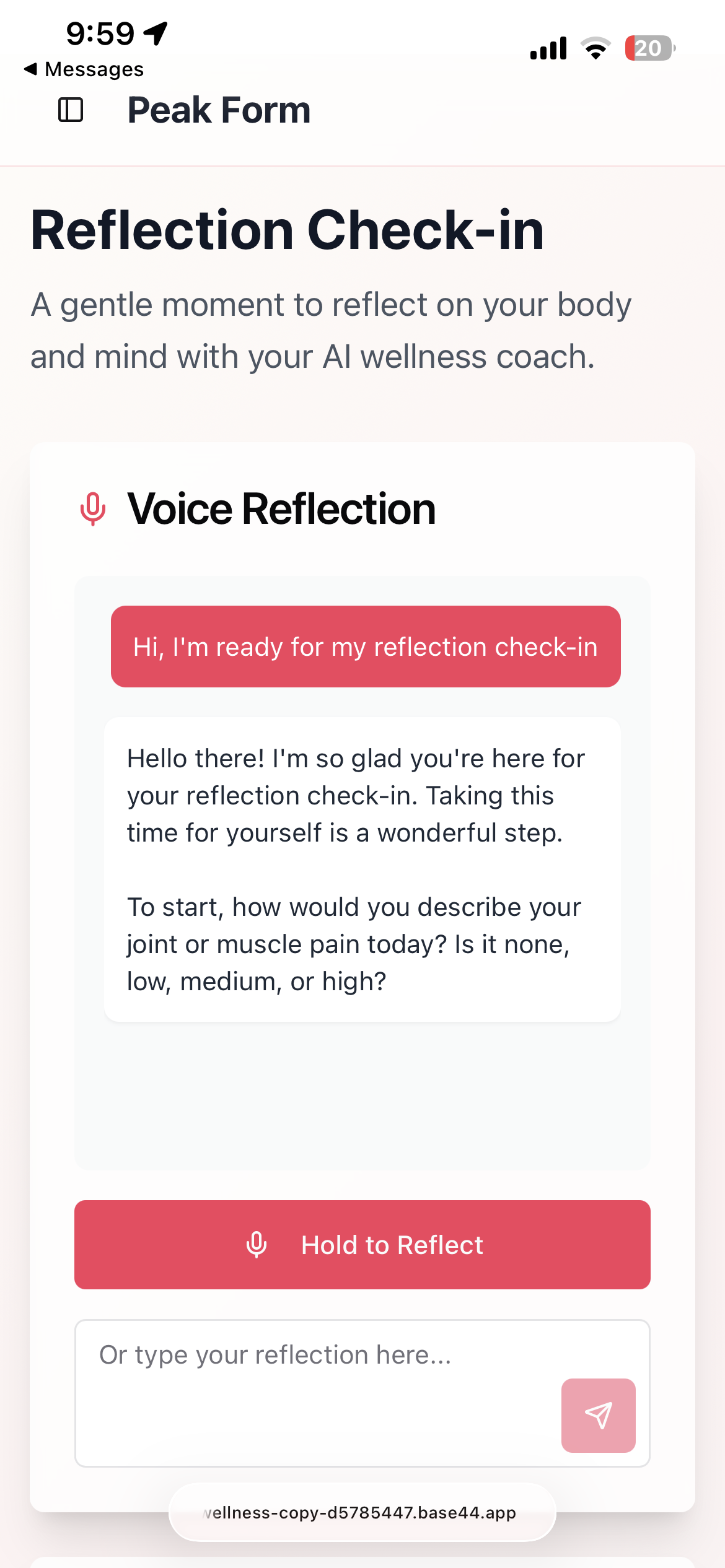
My initial solution to improve this feature was an AI chatbot that would ask users their journal questions and tailor their responses to the user’s needs. I was concerned, however, if users would feel comfortable using the feature, so with Base44 AI (left image), I created a quick preliminary prototype to test with users. The feedback I received was overwhelmingly positive, so I then further developed the journal feature in Figma (right image).

Onboarding
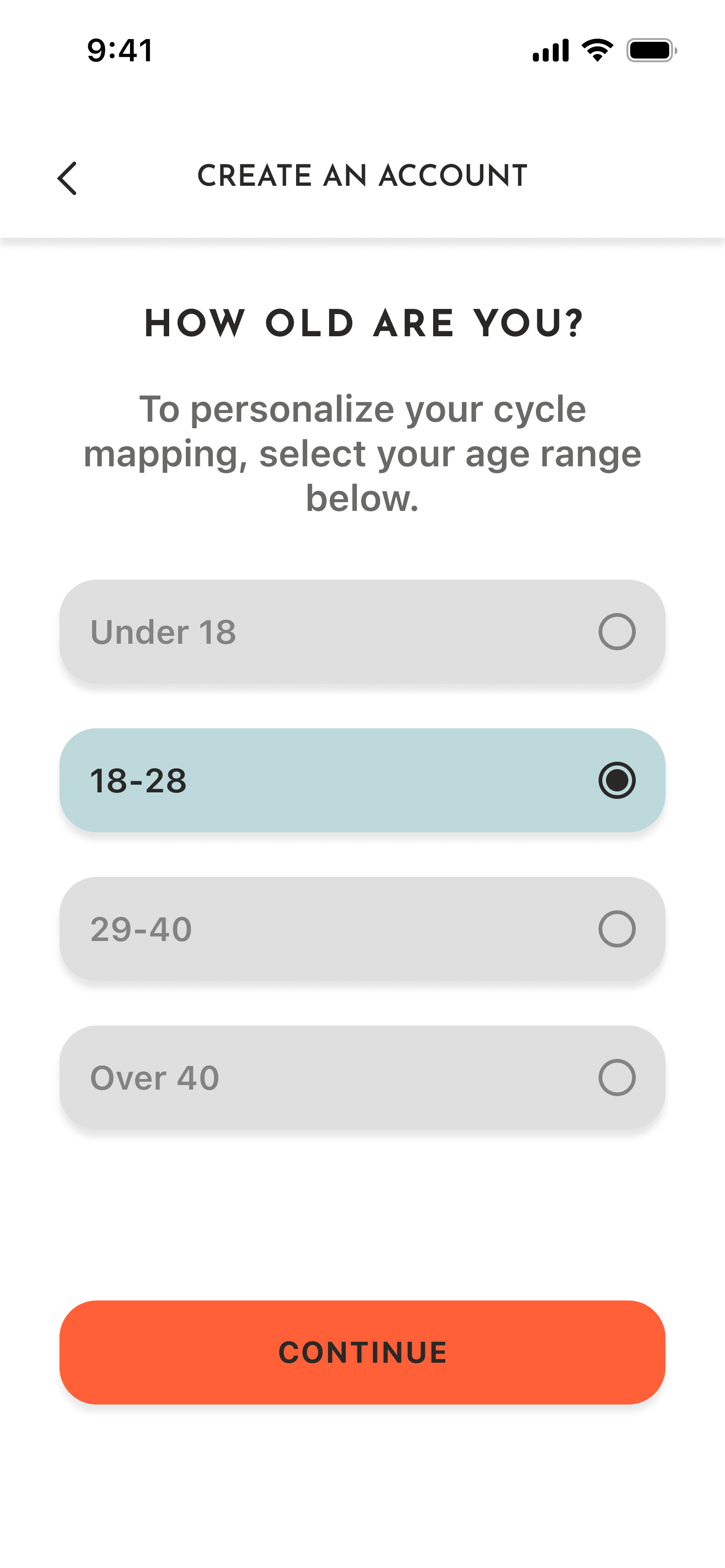
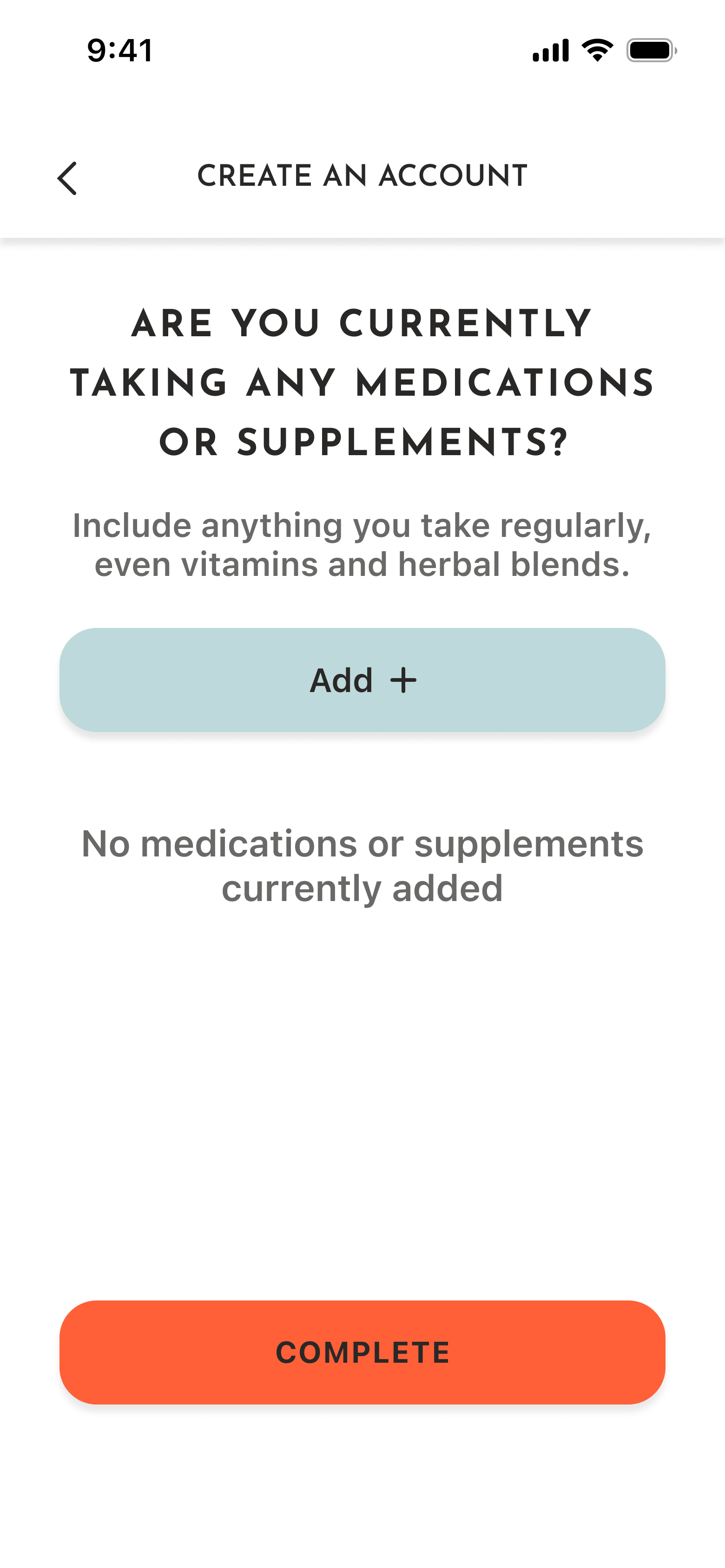
To reduce questions asked in Peak Form’s journal feature, I moved questions that did not need to be asked more than once into the onboarding flow. Although this increased the time it took to register for Peak Form, the majority of users expressed that they would prefer it as it eliminated repetive questions in the journal.

Final Prototype
Results
With the implementation of the new AI journal feature and onboarding, Peak Form has seen an increase in postive feedback from users
Peak form
10.25
Overview
About
Peak Form is more than just a period tracking app. It’s designed specifically for athletes, to help women optimize their performance in athletics and life by providing exercise, nutrition, sleep, and recovery recommendations. Users receive their personalized health insights through logging their period, and can even journal their symptoms and ask questions through Peak Form’s AI chatbot.
Challenge
Peak Form has so many great resources, but users are struggling to access them. Peak Form’s users are reporting that they are frustrated with the amount of time it takes to log their symptoms in the journal feature. Many also report that they haven’t even gotten to use the app because they find the onboarding process confusing.
Goals
01
Improve the usability of Peak Form’s journal feature by reformating how questions are asked and by limiting the number of questions.
02
Design an onboarding flow that implements familiar UX processes and has clear instructions and navigation.
Approach
Journal Feature
Peak Form’s user feedback overwhelmingly expressed their frustrations with the journal feature. Many want to use it, but don’t, due to the excessive number of dropdown menus and questions.
My initial solution to improve this feature was an AI chatbot that would ask users their journal questions and tailor their responses to the user’s needs. I was concerned, however, if users would feel comfortable using the feature, so with Base44 AI (left image), I created a quick preliminary prototype to test with users. The feedback I received was overwhelmingly positive, so I then further developed the journal feature in Figma (right image).
Onboarding
To reduce questions asked in Peak Form’s journal feature, I moved questions that did not need to be asked more than once into the onboarding flow. Although this increased the time it took to register for Peak Form, the majority of users expressed that they would prefer it as it eliminated repetive questions in the journal.
Final Prototype
Results
With the implementation of the new AI journal feature and onboarding, Peak Form has seen an increase in postive feedback from users
Peak form
10.25
Overview
About
Peak Form is more than just a period tracking app. It’s designed specifically for athletes, to help women optimize their performance in athletics and life by providing exercise, nutrition, sleep, and recovery recommendations. Users receive their personalized health insights through logging their period, and can even journal their symptoms and ask questions through Peak Form’s AI chatbot.
Challenge
Peak Form has so many great resources, but users are struggling to access them. Peak Form’s users are reporting that they are frustrated with the amount of time it takes to log their symptoms in the journal feature. Many also report that they haven’t even gotten to use the app because they find the onboarding process confusing.
Goals
01
Improve the usability of Peak Form’s journal feature by reformatting how questions are asked and by limiting the number of questions.
02
Design an onboarding flow that implements familiar UX processes and has clear instructions and navigation.
Approach
Journal Feature
Peak Form’s user feedback overwhelmingly expressed their frustrations with the journal feature. Many want to use it, but don’t, due to the excessive number of dropdown menus and questions.
My initial solution to improve this feature was an AI chatbot that would ask users their journal questions and tailor their responses to the user’s needs. I was concerned, however, if users would feel comfortable using the feature, so with Base44 AI (left image), I created a quick preliminary prototype to test with users. The feedback I received was overwhelmingly positive, so I then further developed the journal feature in Figma (right image).
Onboarding
To reduce questions asked in Peak Form’s journal feature, I moved questions that did not need to be asked more than once into the onboarding flow. Although this increased the time it took to register for Peak Form, the majority of users expressed that they would prefer it as it eliminated repetitive questions in the journal.
Users had expressed that they found the instructions in Peak Form’s onboarding flow to be confusing and thought the layout was unintuitive. After conducting further user testing, I found that the best way to remedy the confusion due to the instructions was to make them clear and concise. My solution for the unintuitive layout was to create a traditional onboarding flow that users would be familiar with.
Final Prototype
Results
With the implementation of the new AI journal feature and onboarding, Peak Form has seen an increase in positive feedback from users. Several have also expressed their interest in expanding the AI chatbot that is used for the journal feature to allow users to ask it questions.
Peak Form’s new app is still in development, but check out what’s to come with the prototype below!